
Online security basics: the eight things that actually matter
Why you are seeing this page
This article is advertising-funded. The buttons marked partner link lead to the vendor through an affiliate programme, and Bovama stav s.r.o. is paid a commission on sales made that way. That funding pays for the writing and hosting; it does not buy a favourable verdict, and everything below that can be checked has been checked against the vendor’s own documentation, which is cited at the end.
We are not Norton and we cannot sell, service or cancel a Norton subscription. Read the full funding disclosure.
Most security advice is a list of thirty items nobody completes. This is the short list, in the order we would do it, with the reasoning for each — and none of it requires buying anything.
1. Turn on automatic updates and leave them on
The overwhelming majority of successful attacks on home machines use a flaw that already has a fix. Automatic updates for the operating system, the browser and anything that opens files from the internet close that window without you thinking about it. If a device no longer receives security updates at all, that is the moment to plan its replacement, whatever else you run on it.
2. Put two-factor authentication on your e-mail first
Your e-mail account is the master key: it can reset the password of nearly everything else you own. Secure it before anything else. An authenticator application or a hardware key is materially stronger than SMS codes, which can be intercepted by transferring your number to another SIM, but SMS is still far better than nothing.
3. Use a password manager and stop reusing passwords
Reuse is what turns one company’s breach into your problem. Criminals take username and password pairs from a breach and try them everywhere else automatically. A password manager removes the need to remember anything, which is the only reason reuse exists. Several are free; some security suites, including Norton AntiVirus Plus, bundle one.
4. Learn to read a phishing message
The most common single cause of account compromise is a person entering real credentials into a convincing fake page. The tells are consistent.
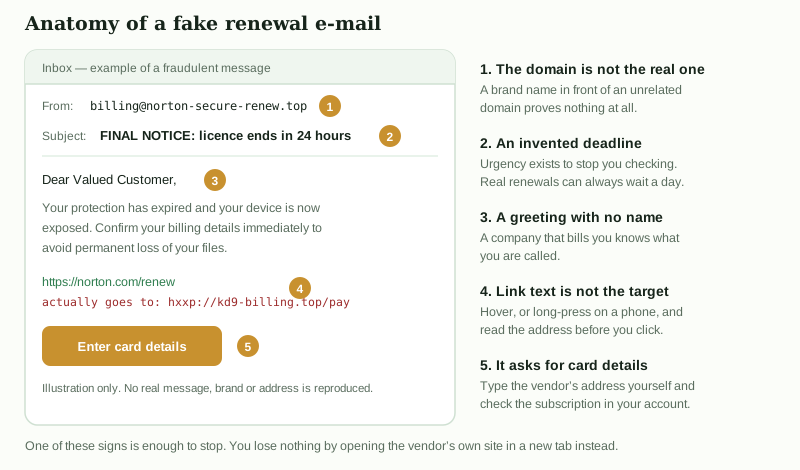
The single habit worth building: never act on the link in the message. Open a new tab, type the address yourself, and check your account there.
5. Make a backup you have actually restored from
This is the only measure that still helps after everything else has failed — ransomware, theft, a dead disk, or your own deleted folder.
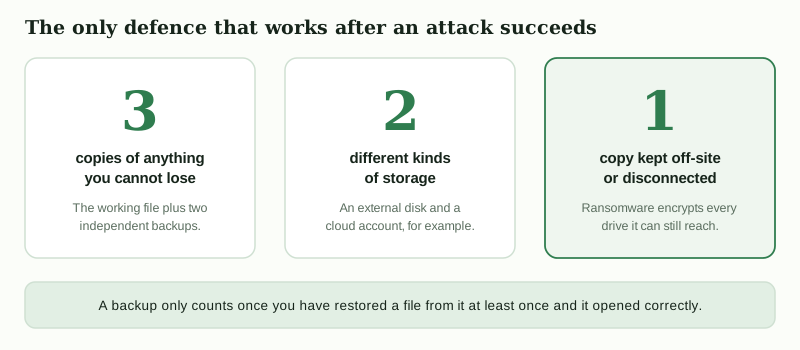
The detail people miss is the last one: a backup drive left permanently connected will be encrypted along with everything else, because ransomware encrypts whatever it can reach. Disconnect it, or use a service with versioning so an earlier copy survives.
6. Run one real-time scanner — exactly one
Windows includes Microsoft Defender Antivirus at no cost, and it is tested by the same independent laboratories as the paid products. A paid suite adds convenience features rather than immunity: a friendlier firewall, a password manager, cloud backup, cross-browser scam filtering and support you can contact. Whether that is worth a subscription is a personal judgement.
What matters technically is not running two at once. Two real-time engines fight over the same files and can leave you less protected than either alone.
If you decide a paid suite suits you
Norton AntiVirus Plus covers one device and includes a firewall, password manager and 2 GB of PC cloud backup. Our full breakdown of what it does and does not include is on the main page.
Open the vendor’s page partner linkPartner link. If you buy after following it, Bovama stav s.r.o. receives a commission from the vendor. You pay exactly the same price as you would by going to the vendor directly, and the commission does not change what is written on this page.
7. Spend ten minutes on your router
Change the administrator password from the printed default, check that the firmware is current (many routers update themselves, many do not), and make sure the Wi-Fi uses WPA2 or WPA3 rather than an older standard. Turn off remote administration from the internet unless you know you need it. Put smart home gadgets on a guest network if your router supports one, so that a cheap device with abandoned firmware is not sitting on the same network as your computer.
8. Understand what public Wi-Fi does and does not risk
The threat from public networks is smaller than it was, because virtually all traffic is now encrypted with HTTPS: the network operator can see which sites you contact, not what you send them. A VPN moves that visibility from the cafe to the VPN provider, which is a real benefit in some circumstances and not a general-purpose shield. What still matters on any network is refusing certificate warnings and not installing anything a captive portal asks you to install.
If you think something has already happened
- Disconnect the device from the network, so that anything present cannot spread or send more data.
- From a different, trusted device, change the password of your e-mail account first, then banking, then everything that shared the compromised password.
- Run a full scan with your security product; consider a bootable rescue scan if it finds something it cannot remove.
- If files have been encrypted, do not pay. Check whether a free decryptor exists for that family before doing anything else, and restore from your backup.
- If payment details were exposed, contact your bank and ask them to monitor or reissue the card.
- Reinstalling the operating system from scratch is the only way to be certain, and is less work than it sounds if your backup is in order.
This guide is general information, not advice about your specific situation, and it is written by a publisher funded by advertising — see how we are funded. Corrections are welcome: info@slovador.online.