
Norton AntiVirus Plus: what it actually includes — and how to judge any antivirus
Why you are seeing this page
This article is advertising-funded. The buttons marked partner link lead to the vendor through an affiliate programme, and Bovama stav s.r.o. is paid a commission on sales made that way. That funding pays for the writing and hosting; it does not buy a favourable verdict, and everything below that can be checked has been checked against the vendor’s own documentation, which is cited at the end.
We are not Norton and we cannot sell, service or cancel a Norton subscription. Read the full funding disclosure.
Marketing pages for security software tend to blur the line between what you are buying and what the vendor sells one tier up. This page separates the two for Norton AntiVirus Plus, explains how modern detection works, and gives you a method for checking any antivirus claim yourself.
The short version
- Norton AntiVirus Plus covers one device, not a household.
- It includes real-time malware protection, a Smart Firewall, a Password Manager and 2 GB of cloud backup on Windows.
- It does not include Secure VPN, Dark Web Monitoring, SafeCam or parental controls. Those belong to the Norton 360 tiers.
- The advertised first-year price is promotional; the subscription renews automatically at the vendor’s then-current rate unless you turn that off.
- No antivirus product replaces updates, unique passwords and a tested backup.
Everything above comes from the vendor’s own product page. Where our description and Norton’s own information diverge, Norton’s information prevails — features and terms change without notice.
Why home devices are targets
There is a persistent belief that criminals only go after companies. In practice, a home computer is a target precisely because it is cheap to attack at scale. Attacks on individuals are not hand-crafted; they are sent to millions of addresses at once, and a fraction of a percent success rate is enough to make the campaign profitable.
The volume involved is easy to underestimate. The AV-TEST Institute, an independent German testing laboratory, states that it registers over 450,000 new malicious programs and potentially unwanted applications every day. That figure counts distinct samples, not distinct campaigns — a single family of malware can generate thousands of variants automatically, precisely so that any scanner relying on a list of known files falls behind.
That is the core problem a modern security product has to solve: the thing arriving on your machine has very often never been seen before by anybody.
How malware actually arrives
Almost every consumer infection starts with a route that requires one human decision. Understanding the four common routes tells you more about your own risk than any product comparison.
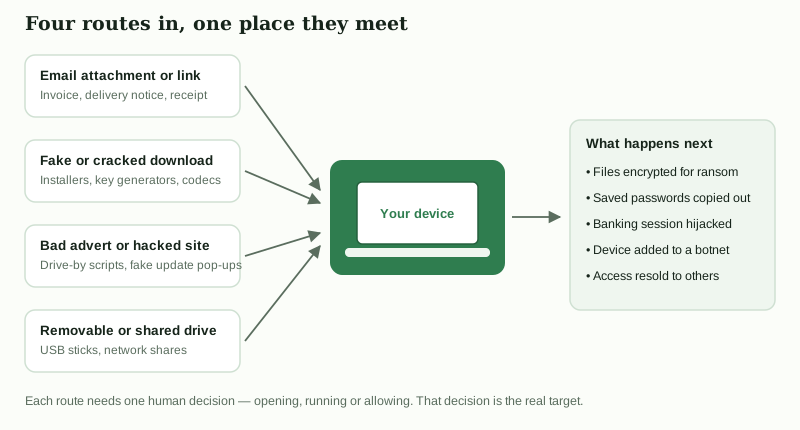
- E-mail attachments and links. Invoices, delivery notices and renewal warnings are the standard pretexts, because they create a reason to open something without thinking.
- Fake or cracked downloads. Installers for paid software obtained outside the vendor’s own channels are one of the most reliable ways to acquire malware, as are “codec” and “driver updater” downloads.
- Malicious adverts and compromised sites. A legitimate site can serve a hostile advert, and a pop-up claiming your browser or Flash plugin needs updating is essentially always fraudulent.
- Removable and shared drives. Less common than it was, but still relevant on shared home and small-office networks.
Notice what all four have in common: the decisive moment is a person clicking, running or allowing something. Security software exists to catch what gets past that moment — not to make the moment irrelevant.
How a scanner reaches a verdict
“Antivirus” is a misleading name for what these products now do. Comparing files against a list of known malware is only the first and least interesting step.
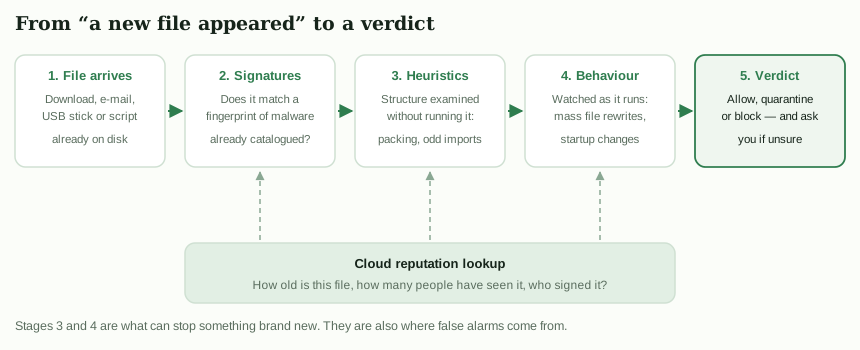
Signatures
A signature is a fingerprint of a file already identified as malicious. Matching is fast and produces almost no false alarms, but by definition it only catches what somebody has already analysed. Against 450,000 new samples a day, signatures alone are a rear-guard action.
Heuristics and static analysis
Here the file is examined without being executed: is the code compressed or obfuscated in a way normal software is not, does it import functions typically used to inject code into other processes, is it signed and by whom, does the internal structure match a known malware toolkit? This can flag something genuinely new, and it is also where false positives begin.
Behaviour monitoring
The most valuable layer in practice. The program is allowed to run while the security product watches what it does: rewriting large numbers of documents in quick succession, adding itself to the startup sequence, disabling recovery options, contacting an address nobody has ever contacted before. Ransomware is usually caught here rather than by signature, because the behaviour is distinctive even when the file is brand new.
Cloud reputation
The product asks the vendor’s service what is known about this exact file: how old it is, how many other users have it, whether it is signed by a recognised publisher. A file first seen twenty minutes ago on a handful of machines is treated very differently from one that has existed for three years on millions. This is also why security software makes network requests of its own, and why some of them contain file hashes — something worth reading the vendor’s privacy documentation about.
What Norton AntiVirus Plus includes
The following is taken from Norton’s own product page for this tier, consulted on 21 September 2026. Vendors change packaging often, so treat it as a snapshot and check the vendor’s page before you buy.
- One device. A single PC, Mac, tablet or smartphone. This is the single most important practical limitation of the tier.
- Real-time protection against malware, ransomware and hacking attempts.
- Smart Firewall for Windows and Mac, controlling which applications may communicate over the network.
- Password Manager, for generating and storing unique credentials.
- 2 GB of cloud backup for PC. Enough for documents and keys; not enough for a photo library, so it complements rather than replaces a real backup plan.
- 100% Virus Protection Promise: Norton states that if a device gets a virus its experts cannot remove, you get your money back. Norton attaches conditions to this, including an automatically renewing subscription; read the promise text on Norton’s site before relying on it.
- Norton also currently markets AI-assisted scam and deepfake detection on this tier. We have not independently tested those features and make no claim about how well they work; availability can differ by platform and region.
| Feature | AntiVirus Plus | Norton 360 tiers |
|---|---|---|
| Real-time malware protection | Yes | Yes |
| Smart Firewall | Yes | Yes |
| Password Manager | Yes | Yes |
| Cloud backup (PC) | 2 GB | More, varies by tier |
| Secure VPN | No | Yes |
| Dark Web Monitoring | No | Yes |
| SafeCam (webcam protection) | No | Yes |
| Parental controls | No | Deluxe and above |
| Devices covered | 1 | Several, varies by tier |
See the current package and price
Feature lists and prices are set by the vendor and change frequently. The only authoritative source is the vendor’s own page.
Open Norton’s product page partner linkPartner link. If you buy after following it, Bovama stav s.r.o. receives a commission from the vendor. You pay exactly the same price as you would by going to the vendor directly, and the commission does not change what is written on this page.
What it does not include
This matters because the absent features are exactly the ones most heavily advertised by the security industry as a whole, and it is easy to assume they come with any paid subscription.
- No VPN. Norton Secure VPN is not part of AntiVirus Plus. If you want encrypted traffic on public Wi-Fi from Norton, that means a Norton 360 tier or a separate subscription.
- No Dark Web Monitoring or identity restoration. The service that watches for your details appearing in breach dumps is a Norton 360 / LifeLock feature, not an AntiVirus Plus one.
- No SafeCam and no parental controls.
- No household coverage. One licence, one device.
A note on where this page came from
An earlier version of this article claimed that Norton AntiVirus Plus included a VPN, dark-web identity monitoring and multi-device coverage. It does not. Those claims have been removed and the corrections are listed in full further down this page.
Why one product is never enough
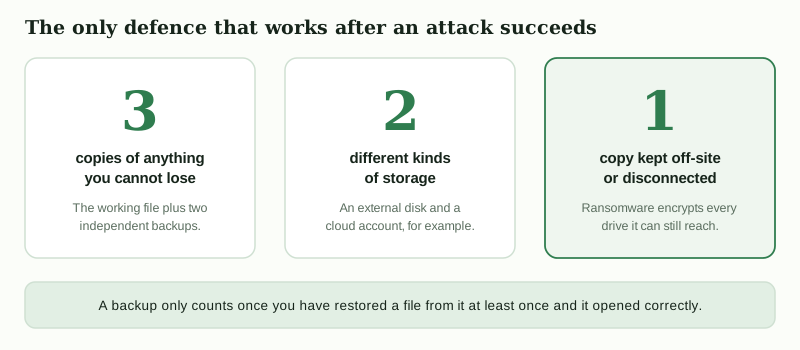
Security is layered, and buying software only reinforces one of the layers. The other four are free.
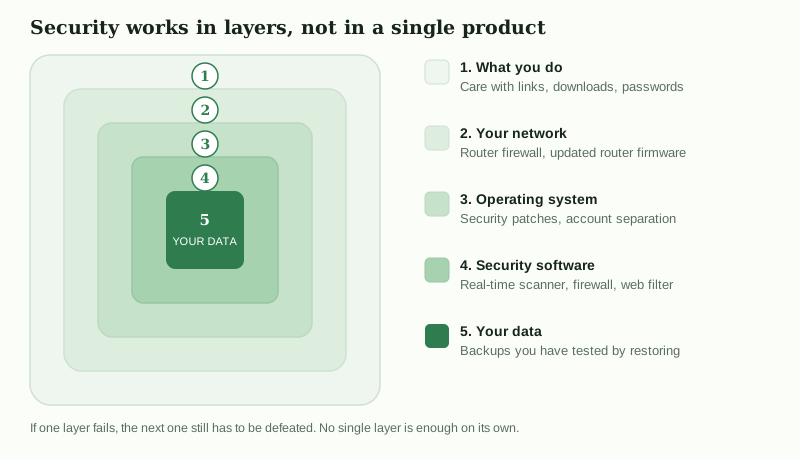
If you are deciding how to spend an hour improving your security, turning on automatic updates, enabling two-factor authentication on your e-mail account and setting up a backup will all do more than any change of antivirus product. That is not an argument against buying one; it is an argument against treating it as the whole job.
How to read independent lab tests
Vendors quote lab results selectively, so it is worth knowing how the labs actually score. We do not reproduce specific scores here, because they change with every test round and a figure copied from a marketing page is worthless by the time you read it. Go to the source instead:
- AV-TEST (Magdeburg) scores consumer products in three categories — Protection, Performance and Usability — with a maximum of 6 points each, 18 in total, and gives a “TOP PRODUCT” award at the top of the range. Usability here means false alarms: a product that blocks everything scores badly.
- AV-Comparatives (Innsbruck) runs a Real-World Protection Test against live threats and awards ADVANCED+, ADVANCED or STANDARD, alongside separate performance and false-positive tests.
- SE Labs (UK) grades products from AAA downwards, weighting how completely a threat was stopped rather than only whether it was detected.
Three things to keep in mind. First, the top ten products are usually separated by a fraction of a percentage point, which is not a meaningful difference for a home user. Second, a product tested well two years ago tells you little about today. Third, some vendors decline to participate in some tests, so an absence from a table is not a failure.
Built-in protection versus a paid suite
Any honest discussion has to mention that Windows 10 and 11 ship with Microsoft Defender Antivirus enabled at no extra cost, and that it is submitted to the same independent laboratories as the paid products. Recent macOS, iOS and Android releases also include their own protective mechanisms.
So what does paying add? Realistically: a firewall with a friendlier interface, a password manager, some cloud backup, web and scam filtering that works across browsers, support you can contact, and a single console when you have several devices. Whether those are worth an annual fee depends on you, not on a detection-rate table. What a paid suite does not add is immunity — and if the extra features it adds are ones you already have elsewhere, the honest answer is that you may not need it.
The one setup to avoid is running two real-time scanners at once. They interfere with each other and can leave you worse protected than either alone. Installing a third-party product normally stands Microsoft Defender down automatically; removing the third-party product should reactivate it, and it is worth checking that it did.
Price, renewal and refunds
We do not quote prices on this page. They differ by country and currency, change frequently, and the figure that matters is the one shown to you at checkout. What is worth understanding is the structure, which is consistent across the industry:
- The advertised price is almost always a first-term promotional rate. The subscription then renews automatically at the vendor’s standard rate, which is typically considerably higher.
- Auto-renewal can generally be switched off in your account without cancelling the current term. Doing so immediately after purchase is a reasonable habit — but note that Norton ties its Virus Protection Promise to an automatically renewing subscription.
- Norton advertises a 60-day money-back guarantee on annual subscriptions on its product page. Conditions apply and can vary by region, so read the refund terms on the vendor’s site.
- Separately from any vendor guarantee, consumers in the EU generally have a 14-day right of withdrawal on distance contracts, although for digital services that right can lapse once you have expressly agreed to immediate performance. Your statutory rights are not affected by anything on this page.
Check the current terms yourself
Price, renewal rate, refund window and device count are all set by the vendor and shown at checkout. Read them there before you commit.
View the vendor’s current terms partner linkPartner link. If you buy after following it, Bovama stav s.r.o. receives a commission from the vendor. You pay exactly the same price as you would by going to the vendor directly, and the commission does not change what is written on this page.
Scams that imitate antivirus vendors
Security brands are among the most heavily impersonated in fraud, precisely because a warning about your security is designed to make you act quickly. The fake “your subscription has expired” e-mail is a fixture of the genre.
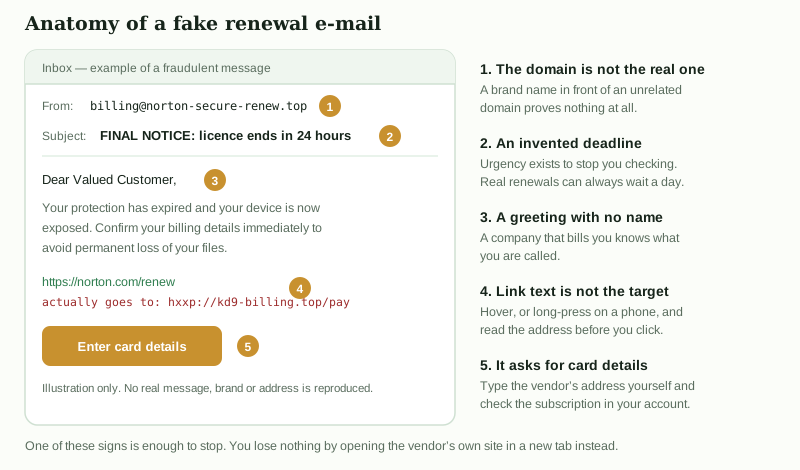
Two habits defeat nearly all of these. Never act on the link in the message — open a new tab and type the vendor’s address yourself, then check your subscription in your account. And treat any unexpected phone number in a security warning as hostile: “tech support” fraud depends on getting you to call, after which you will be talked into granting remote access.
What antivirus cannot do
An honest list of limits is more useful than another list of features:
- It cannot reliably stop you from giving away a password on a convincing fake login page, though web filtering helps.
- It cannot protect an account that has no second factor once the password is known.
- It cannot recover files from a breach of somebody else’s service.
- It cannot undo ransomware that has already run and encrypted your documents. Only a backup can. Paying a ransom funds the next campaign and frequently produces nothing.
- It cannot patch software you refuse to update.
Who this fits
It fits someone protecting a single Windows PC who wants real-time protection, a firewall with a clear interface and a password manager in one subscription, and who would rather have a vendor to contact than manage several free tools.
It fits less well a household with several devices — a multi-device Norton 360 tier or a competing family licence is the sensible comparison there — or anyone who specifically wants a VPN or identity monitoring, neither of which is in this tier. If you already use a standalone password manager and a real backup service, a large part of what you would be paying for is duplicated.
What we corrected
This page replaces an earlier version that contained claims we could not support. In line with our editorial policy, the changes are listed rather than quietly made:
- Removed the claim that Norton AntiVirus Plus includes a secure VPN. It does not; that is a Norton 360 feature.
- Removed the claim that it includes identity theft protection with dark web monitoring, including monitoring of government identity numbers. It does not.
- Removed the claim of multi-device support covering “phone, tablet and computer with one subscription”. The tier covers one device.
- Qualified the cloud backup description: it is 2 GB and PC-only, not an unlimited store for “your most important files”.
- Removed “detection rate among the best in the industry” and “consistently scores highly”, which were unattributed. Replaced with an explanation of how to read the laboratories’ own published results.
- Replaced “millions of new malware variants launched every day” with AV-TEST’s published figure of over 450,000 new malicious programs and PUAs per day.
- Attributed the money-back guarantee and gave its stated length (60 days) rather than implying an open-ended promise, and noted the conditions.
- Removed the unsupported claim that the product has no noticeable performance impact; performance is one of the categories the laboratories measure and readers should check it there.
- Removed the “Reader Stories” framing and the “reader-submitted story” footer. Nothing on this site is reader-submitted, and presenting advertising as a reader account is misleading.
- Added the absent trademark disclaimer, publisher identity, byline, date and sources.
If you find something here that is still wrong, please tell us and we will correct it and say that we did.
Sources
- Norton, Norton AntiVirus Plus product page — feature list, device count, cloud backup allowance, money-back guarantee and Virus Protection Promise terms. Consulted 21 September 2026. us.norton.com/products/norton-antivirus-plus
- AV-TEST Institute, Malware statistics — “Every day, the AV-TEST Institute registers over 450,000 new malicious programs (malware) and potentially unwanted applications (PUA).” av-test.org/en/statistics/malware/
- AV-TEST Institute, consumer test methodology and award criteria (Protection, Performance, Usability; 6 points each). av-test.org/en/about-the-institute/test-procedures/
- AV-Comparatives, Real-World Protection Test methodology and award levels. av-comparatives.org/real-world-protection-tests/
- SE Labs, public test reports and AAA award scheme. selabs.uk/reports/
- Microsoft, Microsoft Defender Antivirus documentation — inclusion with Windows. learn.microsoft.com
None of the links above is a partner link, and we earn nothing from them. The two buttons on this page marked partner link are the only monetised links here.
If this page helped you decide
Using the button below is the way to support the site. It costs you nothing and takes you to the vendor, where the current price and terms are shown.
Go to Norton AntiVirus Plus partner linkPartner link. If you buy after following it, Bovama stav s.r.o. receives a commission from the vendor. You pay exactly the same price as you would by going to the vendor directly, and the commission does not change what is written on this page.
Independence and accuracy
This article was written by Andrew Bailey for Bovama stav s.r.o. and was not reviewed, approved or paid for by the vendor. Product details were taken from the vendor’s own published material on 21 September 2026 and can change at any time. In case of any divergence between this page and the vendor’s own information, the vendor’s information prevails.
Norton and Norton AntiVirus Plus are trademarks of Gen Digital Inc. or its affiliates. This site is not affiliated with, endorsed by or sponsored by Gen Digital Inc.